Why Your Pool Ads Get Calls from the Wrong People (and How to Fix It)
You are paying for Google Ads, the phone rings, and the caller wants to know where to buy chlorine. Or how to clear a green pool themselves. Or whether you are hiring. Every one of those calls cost you a click, and most pool companies running ads pay for far more of them than they realise.
The good news: this is usually one of the easiest problems to fix in a Google Ads account. Here is why it happens and what to do about it.
Why the wrong people see your ads
Google does not only show your ads for the exact words you chose. Depending on your settings, it shows them for searches it considers related. To Google, “pool cleaning” is related to “pool cleaning tips”, “pool cleaner jobs” and “best pool cleaning robot”. To your business, those searches are worthless.
Three settings usually cause most of the waste:
- Broad keyword matching, which lets Google match your ads to a very wide range of searches.
- Missing negative keywords, the list of words that tell Google which searches to never show your ads for.
- Loose location settings, which can show your ads to people who are merely interested in your area rather than located in it.
The searches pool companies most often pay for by mistake
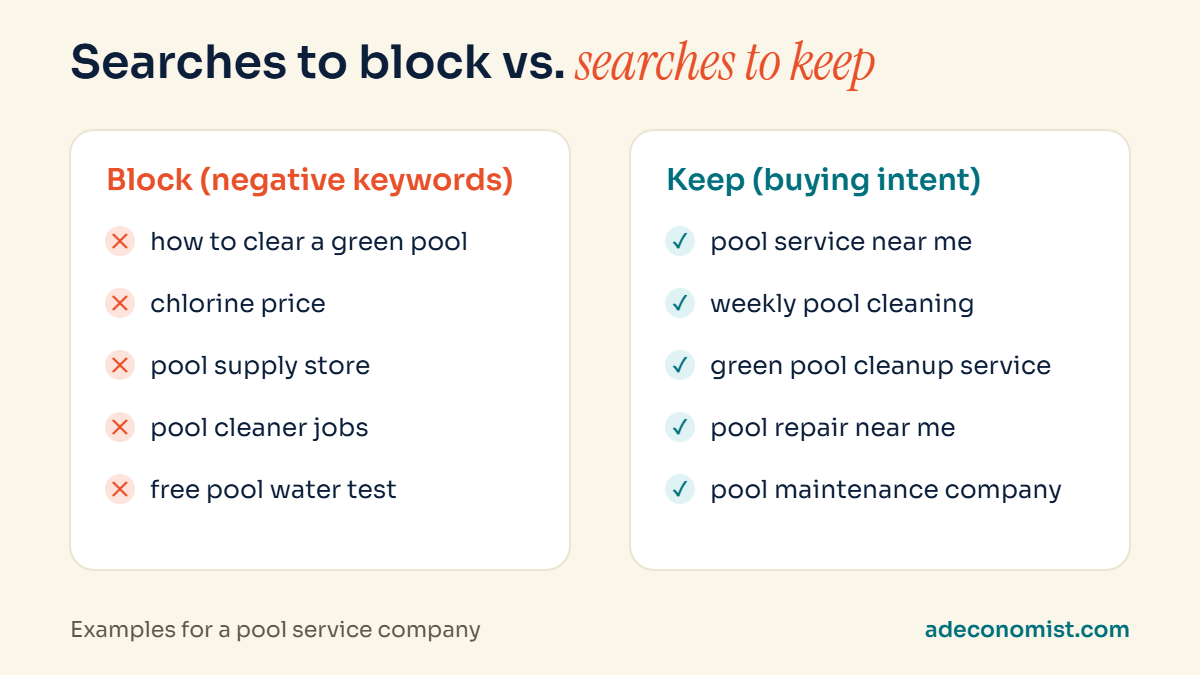
- Do-it-yourself searches: “how to clear a green pool”, “DIY pool cleaning”, “how to vacuum a pool”
- Product shoppers: “chlorine price”, “pool supply store”, “best pool robot”
- Job seekers: “pool cleaner jobs”, “pool tech salary”
- Freebie hunters: “free pool water test”
- Wrong services: pool construction, pool tables, public swimming pools, depending on what you offer
Signs your account has this problem
- Callers ask for products, prices of chemicals or advice rather than a service visit.
- You get calls from outside your service area.
- Your cost per lead keeps rising while the number of real customers stays flat.
- The search terms report contains words like “DIY”, “how to”, “jobs” or brand names of pool products.
A real example from another trade
This is not unique to pools. When I took over the Google Ads account for a home painting company in Toronto, one keyword was eating a big share of the budget: “painting services”. It looked perfectly relevant. But a lot of those clicks came from people looking for car paint jobs, wood painting, pipe painting and coatings for industrial storage tanks, not someone to paint their living room.
Adding exclusions one by one helped, but irrelevant paint-related traffic kept appearing. In the end, I excluded the broad term itself and kept the specific keywords for home and wall painting. The budget stopped leaking, because the ads only showed for the searches the business actually wanted. The same thinking applies to pool companies.
Keyword match types, explained simply
Match types control how closely a search has to match your keyword before your ad can show. Understanding them is half the battle.
- Broad match lets Google show your ad for searches it considers related, which can include very loose matches. It needs strong negative keywords and good tracking to work well.
- Phrase match shows your ad when the search includes the meaning of your phrase, such as “weekly pool service in Scottsdale” for the keyword “weekly pool service”.
- Exact match is the tightest, showing your ad for searches with the same meaning as your keyword.
For most pool companies with modest budgets, starting with phrase and exact match, then expanding carefully once tracking is reliable, wastes far less money than starting broad.
How to fix it, step by step
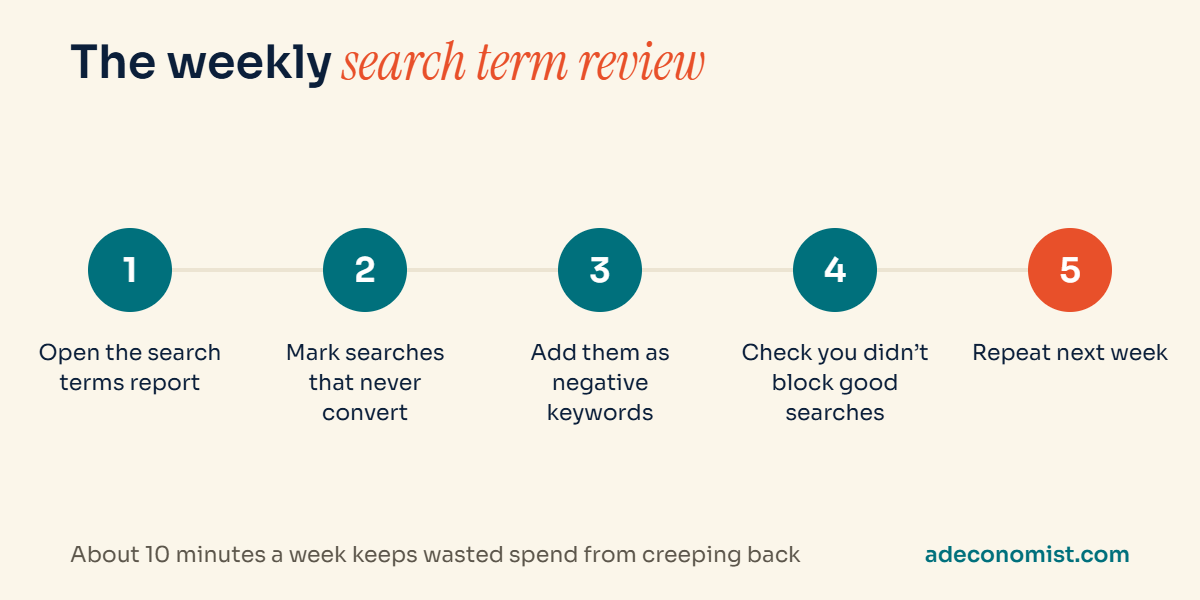
1. Read your search terms report. In Google Ads, the search terms report shows the actual searches that triggered your ads. This is the single most useful report in any local account. Look at the last 30 to 90 days and mark every search that would never become a customer.
2. Build negative keyword lists. Turn those bad searches into negative keywords. Group them into lists (DIY, products, jobs, free) so you can apply them to every campaign at once. Use the most general word that safely blocks a whole category, such as “jobs” or “DIY”, rather than adding hundreds of individual searches.
3. Tighten your keywords. Focus on searches that show someone wants to hire a company: “pool service near me”, “weekly pool cleaning”, “green pool cleanup service”. Be careful with very broad terms that can mean many different things.
4. Check your location settings. Make sure your campaigns target people who are located in or regularly in your service area, not people who have merely shown interest in it.
5. Repeat every week. New irrelevant searches appear all the time, especially at the start of the season. A weekly ten-minute review of search terms keeps the waste from creeping back.
A starter negative keyword list for pool companies
Every business is different, so treat this as a starting point and check each word against your own services before adding it:
- Do-it-yourself: DIY, how to, tutorial, video, guide
- Products and stores: price, buy, store, supply, chlorine, robot, Amazon, Walmart
- Jobs: jobs, hiring, career, salary, training, certification
- Free and cheap: free, coupon (only if you never offer them)
- Wrong services: construction, installation or table, depending on what you do
Add these at the account or campaign level as lists, so every new campaign is protected from day one.
Be careful not to block good searches
Negative keywords are powerful, and a careless one can quietly block customers. Excluding “cheap”, for example, might also block “cheap weekly pool service near me”, which could be a perfectly good lead for some businesses. Before adding a broad exclusion, check that it does not also appear in searches you want.
Wrong calls are not only a keyword problem
Sometimes the searches are fine, but the calls still go nowhere. Two other settings are worth checking:
Ad schedule. If your ads run at night or on Sundays when nobody answers, callers ring once, get no reply and call a competitor. Run call-focused ads only when someone can pick up, or send out-of-hours visitors to a quote form instead.
Ad wording. Ads that only say “pool cleaning” attract everyone with a pool question. Ads that say “weekly pool service in Scottsdale, book a visit” attract people ready to hire a company in your area. Clear, specific ad copy filters out the wrong people before they click, so you never pay for them.
What changes when you fix it
When irrelevant searches are removed, the same budget reaches more people who actually want a pool company. You get fewer wasted calls, your cost per real lead usually falls, and your reports start reflecting real demand, which makes every other decision easier.
Want a second pair of eyes on your search terms?
If your ads bring in calls that go nowhere, I can review your account for free, including your search terms, and show you exactly what I would exclude. Request a free Google Ads audit.