
How Much Should a Pool Company Spend on Google Ads?
If you run a pool service company, the honest answer is this: most pool companies need around $1,500 to $2,500 a month in Google Ads spend to generate enough leads to judge results properly. Below that, a few expensive clicks and one slow week can make a perfectly good campaign look like a failure.
Here is how I arrive at that range, using real numbers, so you can work out the right budget for your own market.
What a click costs for pool services
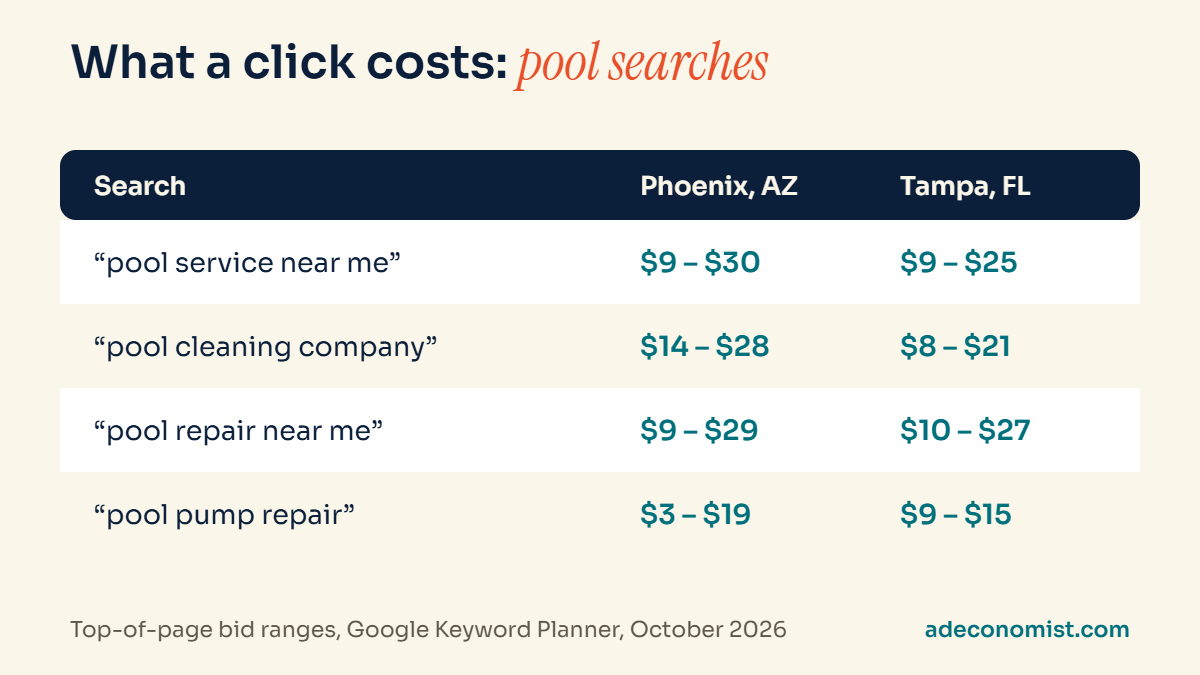
Google’s Keyword Planner shows the range advertisers typically pay to appear at the top of the page. When I checked common pool searches in October 2026, the ranges looked like this:
- “pool service near me”: about $9 to $30 in Phoenix, $9 to $25 in Tampa
- “pool cleaning company”: about $14 to $28 in Phoenix, $8 to $21 in Tampa
- “pool repair near me”: about $9 to $29 in Phoenix, $10 to $27 in Tampa
- “pool pump repair”: about $3 to $19 in Phoenix, $9 to $15 in Tampa
Your actual cost per click usually lands somewhere between the low and high end of those ranges. For planning, I assume roughly $12 to $15 per click for core pool service searches in a competitive US city. Smaller towns are often cheaper.
From budget to leads: the simple math
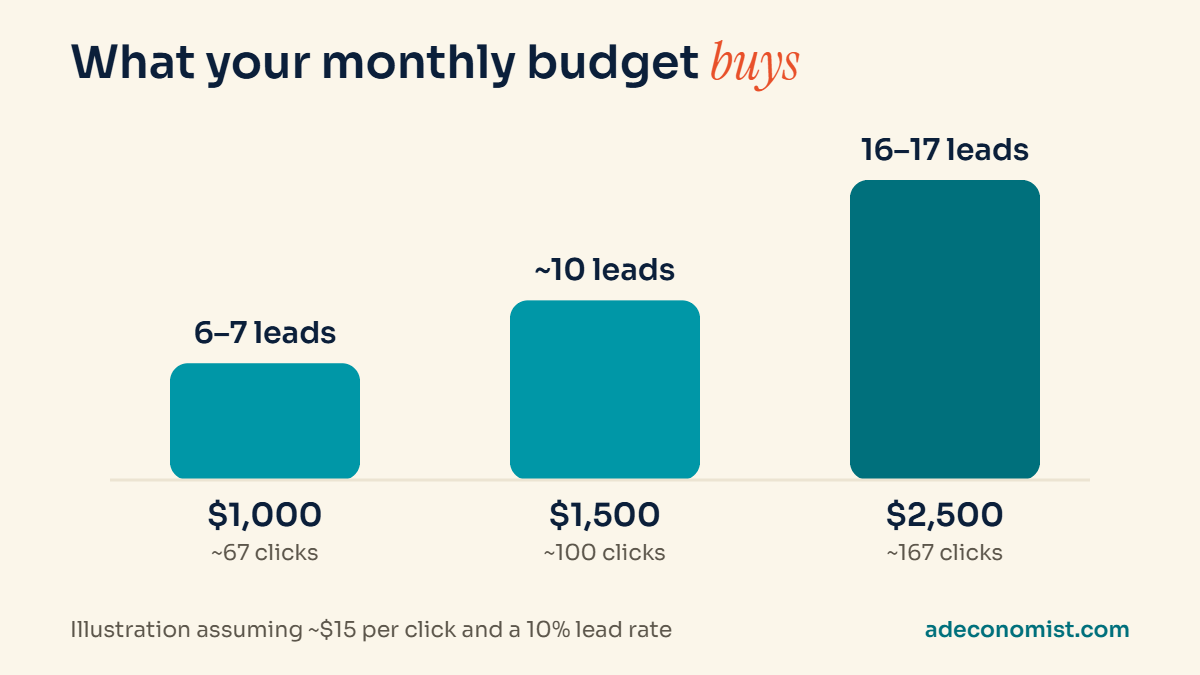
Once you know your likely cost per click, the rest is arithmetic. If around 10% of the people who click call you or fill in your form (a realistic rate for a well-built pool service page), a $15 click budget works out like this:
- $1,000 a month: about 67 clicks, roughly 6 to 7 leads
- $1,500 a month: about 100 clicks, roughly 10 leads
- $2,500 a month: about 167 clicks, roughly 16 to 17 leads
Six or seven leads a month is very little room for error. If two of them are tire-kickers and one week is slow, the month looks bad, even if the campaign itself is set up well. At $1,500 and above, you have enough volume to see what is working and cut what is not.
Why small budgets often fail
- Too little data. Google’s bidding and your own decisions both need enough clicks and conversions to learn from. With a handful of clicks a week, you are guessing.
- Your budget runs out early in the day. In competitive areas, a small daily budget can be spent by mid-morning, so your ads disappear exactly when homeowners are searching.
- You spread too thin. Trying to cover weekly service, repairs and green-pool cleanups on a small budget means none of them gets enough spend to work.
How to work out your own budget
Start from what a customer is worth to you, not from what feels affordable. Ask yourself three questions:
- What is a new customer worth to you over a year? A weekly service account is worth far more than a one-off repair.
- How many of your leads usually become customers?
- What is the most you would happily pay to win one new customer?
If, for example, you would happily pay $300 to win a weekly service customer and you close one in three leads, you can afford to pay up to $100 per lead. Divide your target number of new customers by your close rate, multiply by that cost per lead, and you have a starting monthly budget.
Spend where the money is
If your budget is limited, concentrate it instead of spreading it:
- Start with your most valuable service, usually weekly service contracts, before adding repairs or cleanups.
- Target a tight service area. Only show ads in the suburbs you actually serve, so you are not paying for calls you cannot take.
- Run ads when you can answer the phone. A missed call from an ad is money spent for nothing.
Signs your budget is too low
- Your ads stop showing before lunchtime because the daily budget is used up.
- You get only a handful of leads a month, so one bad week ruins the month.
- Google shows warnings that your campaigns are limited by budget.
- You cannot tell which keywords or services work, because none get enough clicks to judge.
If several of these sound familiar, the answer is not always to spend more. Often it is better to narrow the campaign first, to one service and a smaller area, so the budget you have can actually work.
A worked example
Here is a simple, illustrative example. Suppose a weekly service customer is worth about $1,800 a year to you, you close one in three leads, and you are comfortable paying $300 to win a new weekly customer. That means you can afford up to $100 per lead.
If you want five new weekly customers a month, you need about 15 leads. At $100 per lead, that is a monthly budget of around $1,500. If your market’s clicks cost $15 and 10% of visitors become leads, your real cost per lead would be about $150, which tells you the campaign has to improve its conversion rate, or your budget needs to grow, before it can hit that target.
The numbers will be different for your business, but the method stays the same: start from customer value, work back to an affordable cost per lead, then check it against what clicks really cost in your area.
Plan around the season
Pool demand rises and falls with the weather. Most companies should spend more in the months leading into and during peak season, and pull back in the quiet months, rather than spending the same amount all year. If you operate in a warm market with a long season, such as Arizona, Florida or Queensland, the quiet period is shorter, but the pattern still matters.
What to track to know your budget is working
- Calls and form leads from your ads, counted separately from other sources.
- Cost per lead: your ad spend divided by the number of real leads.
- Lead quality: how many leads were genuine pool owners in your area who wanted your service.
- Booked customers: the number that actually matters. Track how many leads turn into paying customers each month.
Without call and form tracking, you are judging your budget by guesswork. Setting it up properly is one of the first things I check in any account.
Common budget mistakes
- Spending the same amount all year, regardless of the season.
- Splitting a small budget across every service instead of focusing on the most valuable one.
- Judging results after two weeks. New campaigns need time to settle, typically 60 to 90 days to stabilize.
- Ignoring the search terms report, so part of the budget keeps going to searches that never become customers.
Ad spend versus management fees
One last point that often causes confusion: your ad budget is what you pay Google for clicks. If someone manages your account, their fee is separate. When comparing options, always look at both numbers, and make sure you own your Google Ads account and its data.
Not sure where your budget is going?
If you are already running ads and are not sure whether the money is well spent, I can review your account for free and show you where I would start. Request a free Google Ads audit.